How I Turned Claude Code into an Autonomous Operating System
Memory, automation, and multi-agent coordination
How I built a personal AI infrastructure that learns, remembers, and works while I sleep.
I've spent the past year building an "AI operating system" around Claude Code. What started as simple customizations has turned into a memory system, automation layer, and multi-agent coordinator. Here's how it works.
The Architecture at a Glance
| Layer | Components |
|---|---|
| Memory | diary → patterns → rules → CLAUDE.md |
| Hooks | PreToolUse (safety), SessionStart (context), PreCompact (auto-diary) |
| MCP Servers | Things 3, Strava, Calendar, Agent Mail, Firefly III, + 5 more |
| CLI Tools | browser-.js, job-.js, bd-idea.js, cchist.js, + 35 more |
| Plugins | document-skills, dev-browser, hookify, ralph-wiggum, + 12 more |
| Background | bd-automate (30m), ambient-watcher (always), + 8 launchd agents |
The Memory System: Claude That Learns
My memory system is the foundation—a three-tier pipeline that turns session observations into actionable rules.
How It Works

Phase 1: Capture. At the end of meaningful sessions, I generate a diary entry that records what I worked on, decisions I made, and preferences Claude observed. 131 entries so far.
Phase 2: Extract. The /reflect command analyzes diary entries and extracts patterns with confidence scores:
{
  "id": "a545dd2b-f096-4cfa-b8b2-217aa7d35c96",
  "pattern": "use conventional commit format (feat:, fix:, style:)",
  "confidence": 0.85,
  "occurrences": 12,
  "category": "git",
  "source_diaries": ["2026-01-15-session-2.md", "2026-01-18-session-1.md"],
  "created_at": "2025-12-17T14:23:00Z",
  "last_seen": "2026-01-22T09:15:00Z"
}
Phase 3: Promote. Patterns above threshold (≥0.7 confidence, ≥3 occurrences) automatically sync to my CLAUDE.md. Claude now remembers that I prefer Things 3 for tasks, Apple Calendar as my source of truth, and that I hate when AI text uses em dashes or the rule of three.
The Self-Correcting Loop
When Claude violates a rule (like when it edited a stakeholder quote during an editorial pass), the reflection picks it up:
"Pattern violation detected: Modified user quote during editorial pass. Added explicit rule: NEVER modify user/stakeholder quotes."
Next session, Claude knows not to do that.
The Agent Tools: 40+ CLI Commands
I use a toolkit of CLI commands in ~/agent-tools/ (by Mario Zechner) that Claude can invoke.
Browser Automation (Chrome DevTools Protocol)
browser-start.js --profile    # Launch Chrome with my cookies
browser-nav.js https://url    # Navigate
browser-screenshot.js         # Capture viewport → /tmp/screenshot-*.png
browser-eval.js 'code'        # Execute JS in page context
browser-pick.js "Select..."   # Visual element picker with Cmd+click
browser-content.js https://url # Extract as markdown via Readability
How it works: All tools connect to Chrome's remote debugging port (localhost:9222). browser-start.js launches Chrome with --remote-debugging-port=9222 and optionally syncs my user profile (cookies, logins, extensions) via rsync. The other tools use Puppeteer-core to connect to this instance.
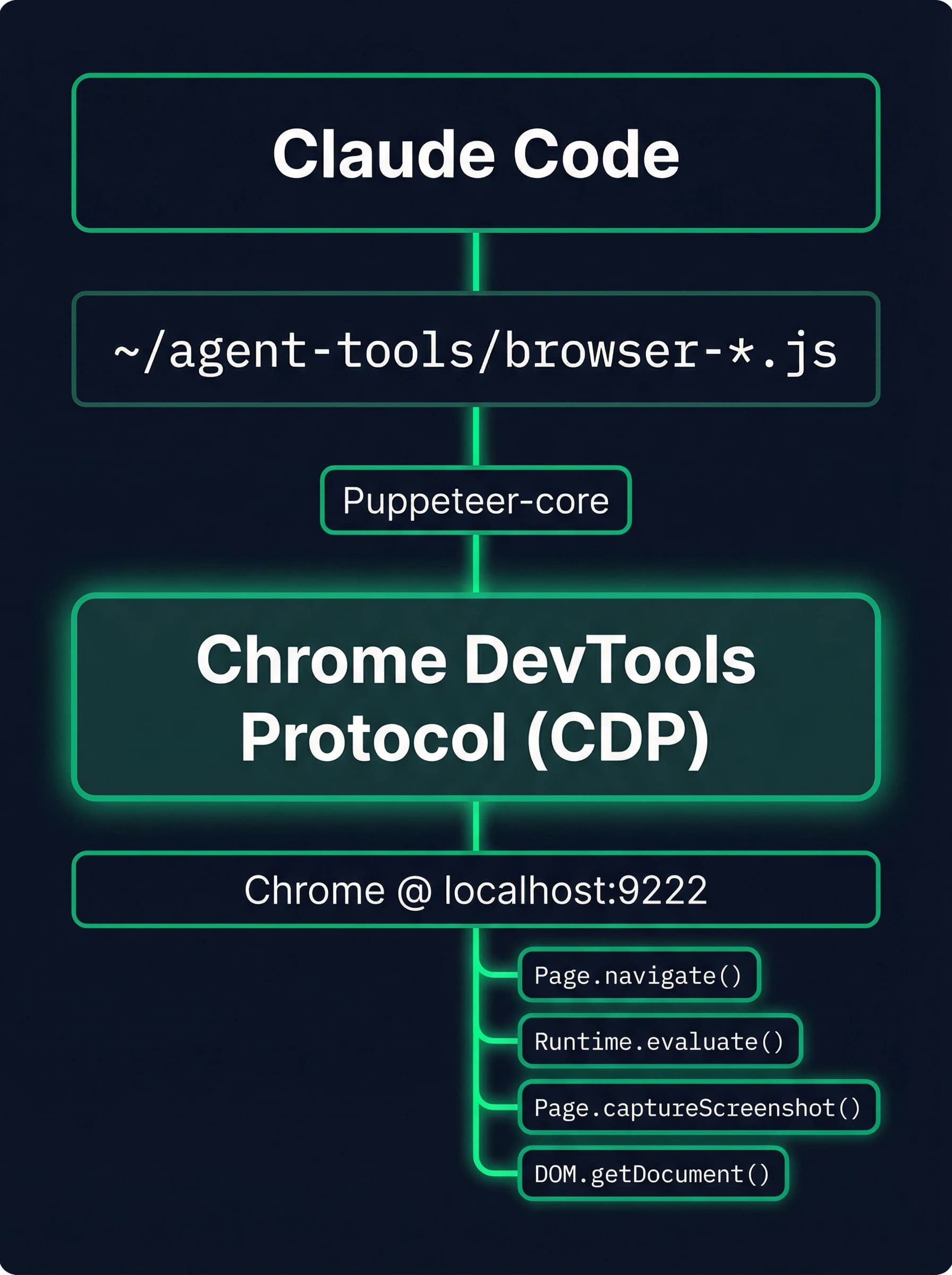
This gives Claude eyes into authenticated web apps—I can say "check my calendar" and Claude screenshots Google Calendar with my actual events visible.
Job Search Pipeline
job-scraper.js --scroll       # Scrape LinkedIn listings (multiple fallback selectors)
job-qualify.js --show-qualified  # Score by CMF algorithm
The qualifier uses weighted scoring:
| Factor | Weight | Example Scores |
|---|---|---|
| Sweet Spot | 40% | Strategy/Ops: 100, Founding PM: 90, Chief of Staff: 80 |
| Company Tier | 25% | Target: 100, Stretch: 80, Known: 60, Unknown: 40 |
| Role Level | 20% | Director+: 100, Senior: 80, Mid: 60 |
| Freshness | 15% | <24h: 100, <7d: 80, <30d: 50 |
Output is P0-P4 priority buckets. Cache lives at ~/.claude/state/job-listings-cache.json so I can re-score without re-scraping.
Idea Capture → Autonomous Implementation
bd-idea "Build a CLI that does X" --priority high
Ideas get captured into my issue tracker (Beads) with an automate label. Every 30 minutes, a background processor (bd-automate) picks the highest-priority item and runs headless Claude to implement it.
One example: I dropped "Build a conversation history search tool" into the queue before bed. Woke up to a working cchist.js CLI that searches across all my Claude Code sessions with fuzzy matching, date filtering, and JSON output.
Personal Infrastructure CLIs
Beyond the agent-tools, I use a set of Go/Rust CLIs that integrate with my personal systems:
| Tool | Creator | Purpose | Example |
|---|---|---|---|
spogo | Peter Steinberger | Spotify control | spogo play "focus playlist" |
gmcli | Peter Steinberger | Gmail management | gmcli search "from:recruiter" |
gdcli | Peter Steinberger | Google Drive | gdcli upload report.pdf |
gccli | Peter Steinberger | Google Calendar | gccli list --today |
remindctl | Peter Steinberger | Apple Reminders | remindctl add "Call back" --due 3pm |
eightctl | Peter Steinberger | Eight Sleep bed | eightctl temp --side left --level 2 |
imsg | Peter Steinberger | iMessage/SMS | imsg send "+1234567890" "omw" |
brabble | Peter Steinberger | Voice wake word | Hands-free Claude via "Hey Brabble" |
These complement the MCP servers—sometimes a quick CLI is faster than a tool call.
Metrics & Analytics
claude-stats --days 7           # Session analytics
outreach.js --show-streak       # Job search streak counter
impact.js                       # Weekly impact dashboard
deliverables.js                 # What I shipped
The metrics tools analyze diary entries and track patterns across sessions—how much time on coding vs. research, quality scores, file churn.
MCP Servers: 10 Integrated Systems
The Model Context Protocol lets Claude talk to external services natively.
| Category | Server | Key Tools |
|---|---|---|
| Productivity | Things 3 | get_today, add_todo, update_todo |
| Calendar | list_events, create_event, get_freebusy | |
| Personal | Strava | activities, streams, zones |
| Firefly III | accounts, transactions, categories | |
| Knowledge | Readwise | search_highlights |
| Roam | search_text, create_page, add_todo | |
| Coordination | Agent Mail | send_msg, reserve_file, fetch_inbox |
| System | Apple | messages, reminders, notes |
Agent Mail: Multi-Agent Coordination
When I spin up multiple Claude instances for parallel work, they need to coordinate. Agent Mail provides:
- Message threading between agents (with Git-backed storage for audit trails)
- File reservations to prevent edit conflicts (45-minute expiry, renewable)
- Contact permissions for agent-to-agent communication

The Automation Layer: Claude Works While I Sleep
10 LaunchAgents (macOS Scheduled Tasks)
| Agent | Frequency | Purpose | Timeout |
|---|---|---|---|
bd-automate | Every 30 min | Process idea queue | 35 min |
ambient-watcher | Always on | Monitor file changes | 1 hour |
process-cleanup | Every 2h | Kill zombie processes | 60s |
chat-summarizer | Daily 6 AM | Summarize sessions | 20 min |
bd-daemon-health | Every 5 min | Monitor background tasks | 60s |
screenshot-classifier | Every 4h | Auto-process screenshots | 15 min |
weekly-events-summary | Sunday 11:59 PM | Weekly recap | 5 min |
claudio-report | Daily 6 AM | Generate reports | 60s |
process-cleaner | Every hour | Orphan cleanup | 60s |
All agents have TimeoutSeconds set to prevent zombie accumulation—a rule I learned the hard way after finding 47 stale processes one morning.
The Ambient Context System

Claude starts each session knowing what changed—no explanation needed.
The Idea Processor (bd-automate)
Every 30 minutes:
- Scan all Beads workspaces for issues labeled
automate - Rank by priority using graph analysis (
bv -robot-priority) - Spawn headless Claude (
claude -p) to implement - Update issue with results
- Close on success
Lock file at ~/.beads/automate.lock prevents concurrent runs (45-minute stale lock detection).
Plugins: Extending Claude's Capabilities
I run 16 active plugins from 7 marketplaces:
Document Skills (16 sub-skills)
- pdf: Extract, merge, split, fill forms, generate
- xlsx: Spreadsheet operations with formulas
- pptx: Presentations
- docx: Documents with tracked changes
Developer Tools
- dev-browser: Persistent Playwright server with stateful pages (14% faster, 39% cheaper than Playwright MCP)
- hookify: Create behavioral hooks without editing JSON—just describe what should happen
- ralph-wiggum: Self-referential loops where Claude feeds its own output back as input
- agent-sdk-dev: Create and verify Agent SDK applications with verifiers for Python/TypeScript
OpenProse
A programming language for AI sessions by irl-dan:
agent researcher:
  search for "topic"
  **until comprehensive understanding**

agent writer:
  draft based on researcher.findings
The **until X** syntax is a semantic loop condition—it keeps running until Claude judges the condition true.
The Hooks: Guardrails and Context
Safety Guard (PreToolUse)
A Python hook intercepts commands before execution:
BLOCKED_PATTERNS = [
    r"git reset --hard",
    r"rm -rf",
    r"git clean -f",
    r"git push.*--force",
    r"git stash drop",
]

ALLOWED_PATTERNS = [
    r"git stash$",           # stash without drop is safe
    r"git checkout -b",      # creating branches is safe
    r"rm -rf /tmp/",         # tmp cleanup is fine
]
This saved me last week when I asked Claude to "clean up the branch" and it tried to run git reset --hard origin/main. The hook blocked it, and Claude rephrased to a safer approach.
Session Start Context
Every session begins with:
- Current date/time (injected by hook)
- Memory stats (20 rules, 28 patterns)
- Ambient events (recent file changes)
- Morning kickstart trigger (first session of day)
Status Line
prototype-01 (main) | opus | ████████░░ 78% | $2.34
Real-time visibility into directory, model, context usage, and session cost.
Configuration Philosophy
1. Everything is Git-Controlled
My ~/.claude/ directory is a git repo. Configuration changes are versioned and reversible.
2. Sensitive Data is Gitignored
history.jsonl    # Chat history (large, sensitive)
state/           # Machine-specific
memory/          # Kept in vault, synced separately
plugins/         # Auto-downloaded, regeneratable
3. Permissions are Whitelisted
Rather than deny-listing bad patterns, I explicitly allow good ones:
{
  "permissions": {
    "allow": [
      "Bash(export PREFERRED_PROVIDER=*)",
      "WebFetch(domain:github.com)",
      "mcp__things__get_today",
      "Skill(document-skills:pdf)"
    ],
    "deny": []
  }
}
46 explicit allows. Anything not listed requires approval.
4. Automation Never Auto-Executes Risky Actions
From my CLAUDE.md:
automation: queue for review, never auto-execute actions that create calendar events, tasks, or file changes
Claude proposes; I approve.
What Doesn't Work Well
Pattern conflicts. Sometimes two rules contradict each other. The memory system doesn't detect this automatically—I have to notice it in practice and manually resolve.
Automation failures at 3 AM. When bd-automate runs overnight and hits an error (rate limit, unclear requirements, missing dependency), it logs and moves on. I wake up to partial work and have to debug what went wrong.
MCP server startup time. Some servers (especially Python ones with heavy imports) add 2-3 seconds to session start. Noticeable when I'm just doing a quick task.
Memory system maintenance. The diary → patterns → rules pipeline requires manual triggering (/reflect, /curate). I've let it go stale for weeks before noticing Claude forgot preferences.
Cost creep. All this automation adds up. The background processors alone run ~$15/month in API calls, mostly from bd-automate implementations.
What I'd Do Differently
Start with the memory system. Basic pattern extraction fixed my biggest frustration: repeating myself every session.
Be aggressive with hooks. The safety guard blocked a git reset --hard that would have nuked an hour of uncommitted work. The upfront cost of writing guards pays for itself immediately.
Embrace MCP servers. 30 minutes setting up the Things MCP saved hours of "paste this into Things" workflows.
The Result
After a year of iteration, Claude Code isn't a CLI tool—it's a personalized AI infrastructure:
| Component | Count |
|---|---|
| Session diaries | 131 |
| Extracted patterns | 28 |
| Active rules | 20 |
| CLI tools | 40+ |
| MCP servers | 10 |
| Background processors | 10 |
| Plugins | 16 |
The system learns, remembers, and works autonomously. It's not perfect—sometimes patterns conflict, sometimes automation breaks—but it's compounding. Every session makes the next one better.
If you're building something similar, I'd love to hear about it. Find me at @samzoloth or sam@samzoloth.com.